ClipFix: 기기 간에 클립보드를 쉽게 공유하세요
ClipFix is a Chrome extension developed by thomasjenkins that allows users to effortlessly share their clipboard between devices. This free add-on falls under the category of Browsers, specifically Add-ons & Tools.
가장 추천하는 대안 프로그램

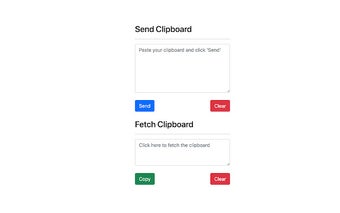
With ClipFix, sharing your clipboard text is a breeze. To send, all you need to do is open the Chrome extension, paste the text from your clipboard, and click the "SEND" button. It's as simple as that! The text will be transferred to your desired device in an instant.
On the receiving end, retrieving the clipboard text is just as easy. Open the ClipFix extension, click on the "FETCH" box, and then click "COPY." Voila! The text is now available on your current device.
One of the great features of ClipFix is that your clipboard text is saved in their data store but gets overwritten each time you submit a new clipboard. This means that none of your data is permanently saved or transferred anywhere else, ensuring your privacy and security.
ClipFix is a handy tool for those who frequently switch between devices and need a quick and convenient way to share clipboard text. With its straightforward interface and reliable functionality, ClipFix simplifies the process of transferring text across devices.














![프로그램 아이콘: Rivals Script [Official] …](https://images.sftcdn.net/images/t_app-icon-s/p/26f85840-bd6f-46db-998d-d85de056273c/94796296/rivals-script-official-free-aiku-infinite-spins-aimbot-icon.png)